

How will EmoGuardian behave if I trade multiple accounts using the same MT5 platform?
EmoGuardian saves the settings for each trading account separately, this means that it will load for each account the last settings you used on that particular account. By pressing the refresh button, you can visualize the parameters currently on the account currently active.Do I have to do something on the first installation of EmoGuardian?
EmoGuardian has been developed to be as user friendly as possible, so there is nothing special to do on the first installation, just load the EA insert the parameters, update and click “on”. The only difference between the first installation and later uses of the EmoGuardian is that on the first installation all parameters will be set to zero.Upon clicking on the update button, I cannot see all parameters on the interactive GUI, what should I do?
If you cannot see the loaded parameters, just click on the cell that appears in Gray and the loaded parameters should appear.What happens if I reinstall EmoGuardian after removing it from the chart?
In case you remove the EmoGuardian from the chart, and you then reinstall it, the EA will use the parameters updated in the previous session. When reloaded, EmoGuardian will only start from the “OFF mode”. In that case the first warning label will be colored grey and it will read “PARAMETERS NOT UPDATED YET”. You can visualize the parameters that the EA will use by just clicking the “Refresh button” (the circle symbol below the on/off button).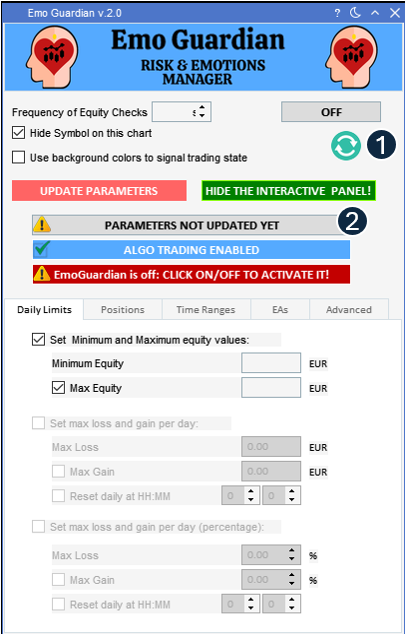 1. The Refresh button will display on the GUI the saved parameters. This will allow us to double-check parameters in used.
2. This warning label in gray color, signals that you are using the risk parameters of a previous session. To change parameters, set it on each tab and select Updates Parameters.
1. The Refresh button will display on the GUI the saved parameters. This will allow us to double-check parameters in used.
2. This warning label in gray color, signals that you are using the risk parameters of a previous session. To change parameters, set it on each tab and select Updates Parameters.